#web
#Figma
#SaaS
#Healthcare
Hospital Cashier System: Enhancing Efficiency in Patient Payment Management
Hospital Cashier System: Enhancing Efficiency in Patient Payment Management
Hospital Cashier System: Enhancing Efficiency in Patient Payment Management
Hospital Cashier System: Enhancing Efficiency in Patient Payment Management
Hospital Cashier System: Enhancing Efficiency in Patient Payment Management
Design for a hospital finance & accounting web application.
Design for a hospital finance & accounting web application.
Design for a hospital finance & accounting web application.
Design for a hospital finance & accounting web application.
Design for a hospital finance & accounting web application.
2024
Timeline
UIUX Designer
Role
Background
Background
Background
Managing financial transactions in a hospital environment requires a system that ensures accuracy, efficiency, and ease of use. Many hospitals still rely on manual processes or outdated systems, which often lead to errors in billing, payment delays, and inefficiencies in financial reporting. To address these challenges, we developed a Hospital Cashier System that streamlines patient billing and payment processes, improving transparency and operational efficiency.
This system is designed to handle inpatient and outpatient transaction management, allowing hospital staff to track patient bills, verify payment statuses, and facilitate multiple payment methods, including cash, credit/debit cards, and insurance claims. However, currently, Bitme can only generate data from another application, NOTES SIMRS. With the system design, a product with good consistency and efficiency can be created.
Managing financial transactions in a hospital environment requires a system that ensures accuracy, efficiency, and ease of use. Many hospitals still rely on manual processes or outdated systems, which often lead to errors in billing, payment delays, and inefficiencies in financial reporting. To address these challenges, we developed a Hospital Cashier System that streamlines patient billing and payment processes, improving transparency and operational efficiency.
This system is designed to handle inpatient and outpatient transaction management, allowing hospital staff to track patient bills, verify payment statuses, and facilitate multiple payment methods, including cash, credit/debit cards, and insurance claims. However, currently, Bitme can only generate data from another application, NOTES SIMRS. With the system design, a product with good consistency and efficiency can be created.
Managing financial transactions in a hospital environment requires a system that ensures accuracy, efficiency, and ease of use. Many hospitals still rely on manual processes or outdated systems, which often lead to errors in billing, payment delays, and inefficiencies in financial reporting. To address these challenges, we developed a Hospital Cashier System that streamlines patient billing and payment processes, improving transparency and operational efficiency.
This system is designed to handle inpatient and outpatient transaction management, allowing hospital staff to track patient bills, verify payment statuses, and facilitate multiple payment methods, including cash, credit/debit cards, and insurance claims. However, currently, Bitme can only generate data from another application, NOTES SIMRS. With the system design, a product with good consistency and efficiency can be created
Responsibility
Responsibility
Responsibility
As a UI/UX Designer, my responsibilities include conducting user research to understand the needs of hospital cashiers and finance teams, analyzing workflows to create user-centric designs, and developing intuitive navigation structures through wireframing and prototyping. I design visually appealing and functional interfaces, ensuring accessibility, readability, and consistency with a structured design system. Additionally, I focus on interaction design, usability testing, and iterative improvements based on user feedback. Collaborating closely with developers and stakeholders, I ensure seamless implementation and alignment with business goals.
As a UI/UX Designer, my responsibilities include conducting user research to understand the needs of hospital cashiers and finance teams, analyzing workflows to create user-centric designs, and developing intuitive navigation structures through wireframing and prototyping. I design visually appealing and functional interfaces, ensuring accessibility, readability, and consistency with a structured design system. Additionally, I focus on interaction design, usability testing, and iterative improvements based on user feedback. Collaborating closely with developers and stakeholders, I ensure seamless implementation and alignment with business goals.
As a UI/UX Designer, my responsibilities include conducting user research to understand the needs of hospital cashiers and finance teams, analyzing workflows to create user-centric designs, and developing intuitive navigation structures through wireframing and prototyping. I design visually appealing and functional interfaces, ensuring accessibility, readability, and consistency with a structured design system. Additionally, I focus on interaction design, usability testing, and iterative improvements based on user feedback. Collaborating closely with developers and stakeholders, I ensure seamless implementation and alignment with business goals.
Goals
Goals
Goals
1
Enhancing Administrative Efficiency
Streamline the cashier’s workflow in managing patient payment transactions for both inpatient and outpatient services.
1
Enhancing Administrative Efficiency
Streamline the cashier’s workflow in managing patient payment transactions for both inpatient and outpatient services.
1
Enhancing Administrative Efficiency
Streamline the cashier’s workflow in managing patient payment transactions for both inpatient and outpatient services.
1
Enhancing Administrative Efficiency
Streamline the cashier’s workflow in managing patient payment transactions for both inpatient and outpatient services.
1
Enhancing Administrative Efficiency
Streamline the cashier’s workflow in managing patient payment transactions for both inpatient and outpatient services.
2
Providing Clear Payment Status Information
Ensure that payment statuses (Paid, Unpaid, Partially Paid) are easily accessible and understandable at a glance.
2
Providing Clear Payment Status Information
Ensure that payment statuses (Paid, Unpaid, Partially Paid) are easily accessible and understandable at a glance.
2
Providing Clear Payment Status Information
Ensure that payment statuses (Paid, Unpaid, Partially Paid) are easily accessible and understandable at a glance.
2
Providing Clear Payment Status Information
Ensure that payment statuses (Paid, Unpaid, Partially Paid) are easily accessible and understandable at a glance.
2
Providing Clear Payment Status Information
Ensure that payment statuses (Paid, Unpaid, Partially Paid) are easily accessible and understandable at a glance.
3
Facilitating Search and Filtering
Allow users to quickly find patients based on name, medical record number, or registration number, as well as filter transactions by payment status or guarantor.
3
Facilitating Search and Filtering
Allow users to quickly find patients based on name, medical record number, or registration number, as well as filter transactions by payment status or guarantor.
3
Facilitating Search and Filtering
Allow users to quickly find patients based on name, medical record number, or registration number, as well as filter transactions by payment status or guarantor.
3
Facilitating Search and Filtering
Allow users to quickly find patients based on name, medical record number, or registration number, as well as filter transactions by payment status or guarantor.
3
Facilitating Search and Filtering
Allow users to quickly find patients based on name, medical record number, or registration number, as well as filter transactions by payment status or guarantor.
4
Simplifying Data Reporting and Exporting
Enable easy data export for financial reporting and accounting purposes.
4
Simplifying Data Reporting and Exporting
Enable easy data export for financial reporting and accounting purposes.
4
Simplifying Data Reporting and Exporting
Enable easy data export for financial reporting and accounting purposes.
4
Simplifying Data Reporting and Exporting
Enable easy data export for financial reporting and accounting purposes.
4
Simplifying Data Reporting and Exporting
Enable easy data export for financial reporting and accounting purposes.
Challenge
Challenge
Challenge
As the solo UI/UX designer for this hospital cashier application, I face several key challenges in ensuring an efficient and user-friendly experience.
Managing complex billing structures is a significant challenge, as patients often have multiple charges under a single reservation, requiring a clear and intuitive display to prevent confusion. Additionally, the system must accommodate various payment schemes, including self-pay, insurance, and BPJS, each with different rules and workflows. With a large volume of transactions, maintaining accessibility and ease of navigation is crucial to avoid overwhelming users while ensuring quick access to critical information.
Performance optimization is also a major concern, as the system must handle extensive datasets without compromising search and filtering speed.
Balancing these challenges while maintaining design consistency and usability requires a structured approach, iterative improvements based on user feedback, and close collaboration with developers and stakeholders to align the design with business and technical requirements.
As the solo UI/UX designer for this hospital cashier application, I face several key challenges in ensuring an efficient and user-friendly experience.
Managing complex billing structures is a significant challenge, as patients often have multiple charges under a single reservation, requiring a clear and intuitive display to prevent confusion. Additionally, the system must accommodate various payment schemes, including self-pay, insurance, and BPJS, each with different rules and workflows. With a large volume of transactions, maintaining accessibility and ease of navigation is crucial to avoid overwhelming users while ensuring quick access to critical information.
Performance optimization is also a major concern, as the system must handle extensive datasets without compromising search and filtering speed.
Balancing these challenges while maintaining design consistency and usability requires a structured approach, iterative improvements based on user feedback, and close collaboration with developers and stakeholders to align the design with business and technical requirements.
As the solo UI/UX designer for this hospital cashier application, I face several key challenges in ensuring an efficient and user-friendly experience.
Managing complex billing structures is a significant challenge, as patients often have multiple charges under a single reservation, requiring a clear and intuitive display to prevent confusion. Additionally, the system must accommodate various payment schemes, including self-pay, insurance, and BPJS, each with different rules and workflows. With a large volume of transactions, maintaining accessibility and ease of navigation is crucial to avoid overwhelming users while ensuring quick access to critical information.
Performance optimization is also a major concern, as the system must handle extensive datasets without compromising search and filtering speed.
Balancing these challenges while maintaining design consistency and usability requires a structured approach, iterative improvements based on user feedback, and close collaboration with developers and stakeholders to align the design with business and technical requirements.
Design Solutions
Design Solutions
Design Solutions
Clear Information Hierarchy
Clear Information Hierarchy
Clear Information Hierarchy
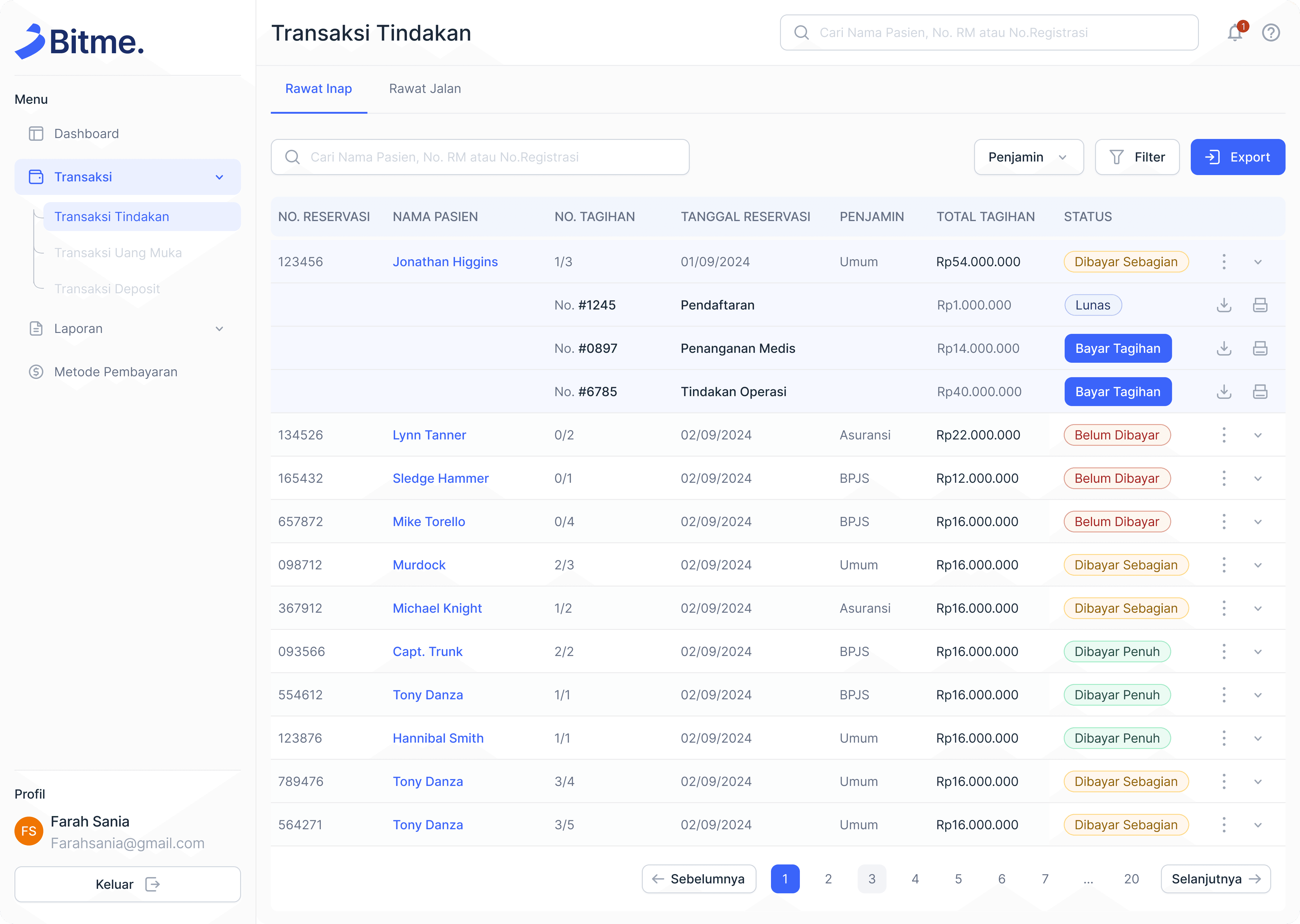
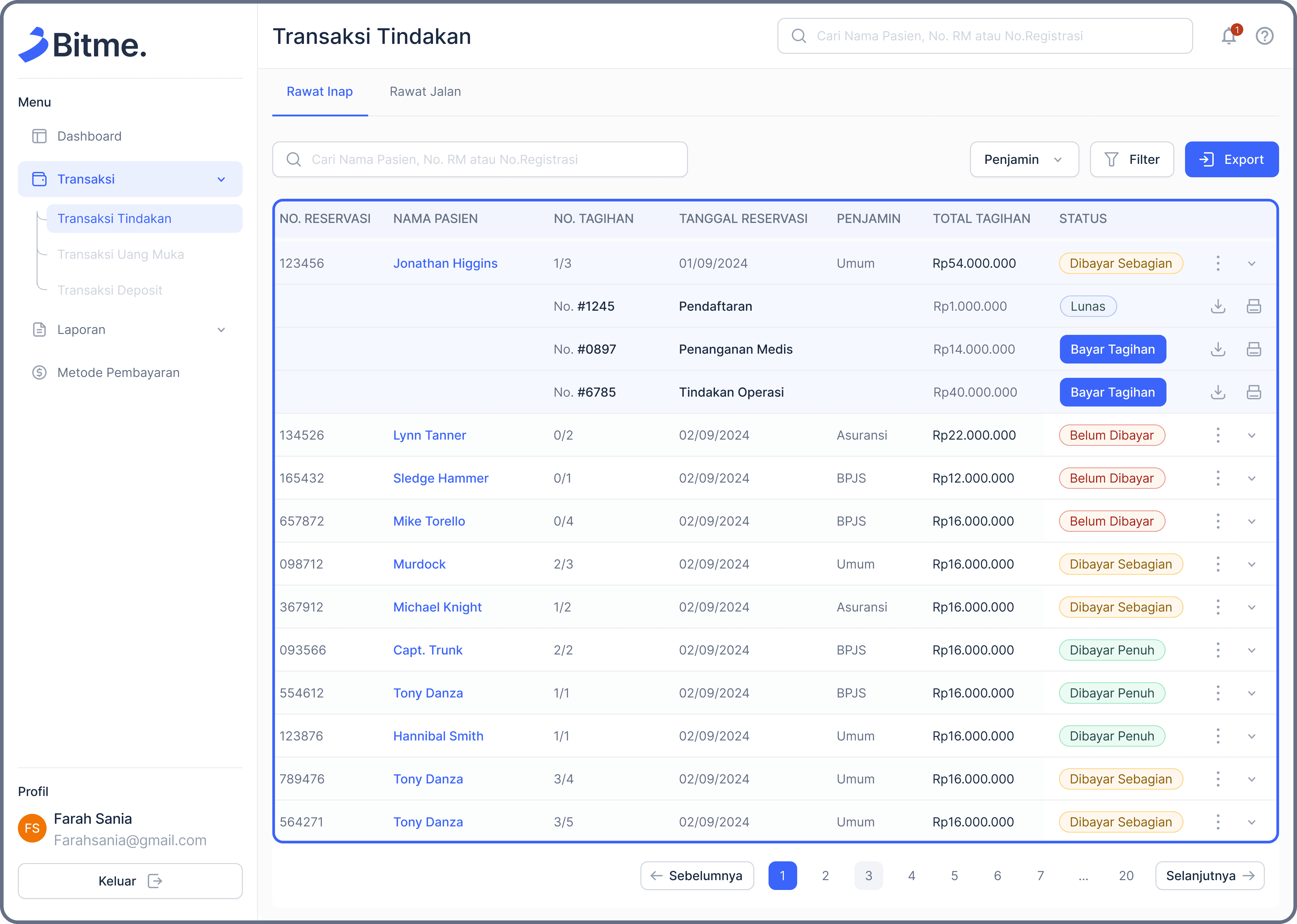
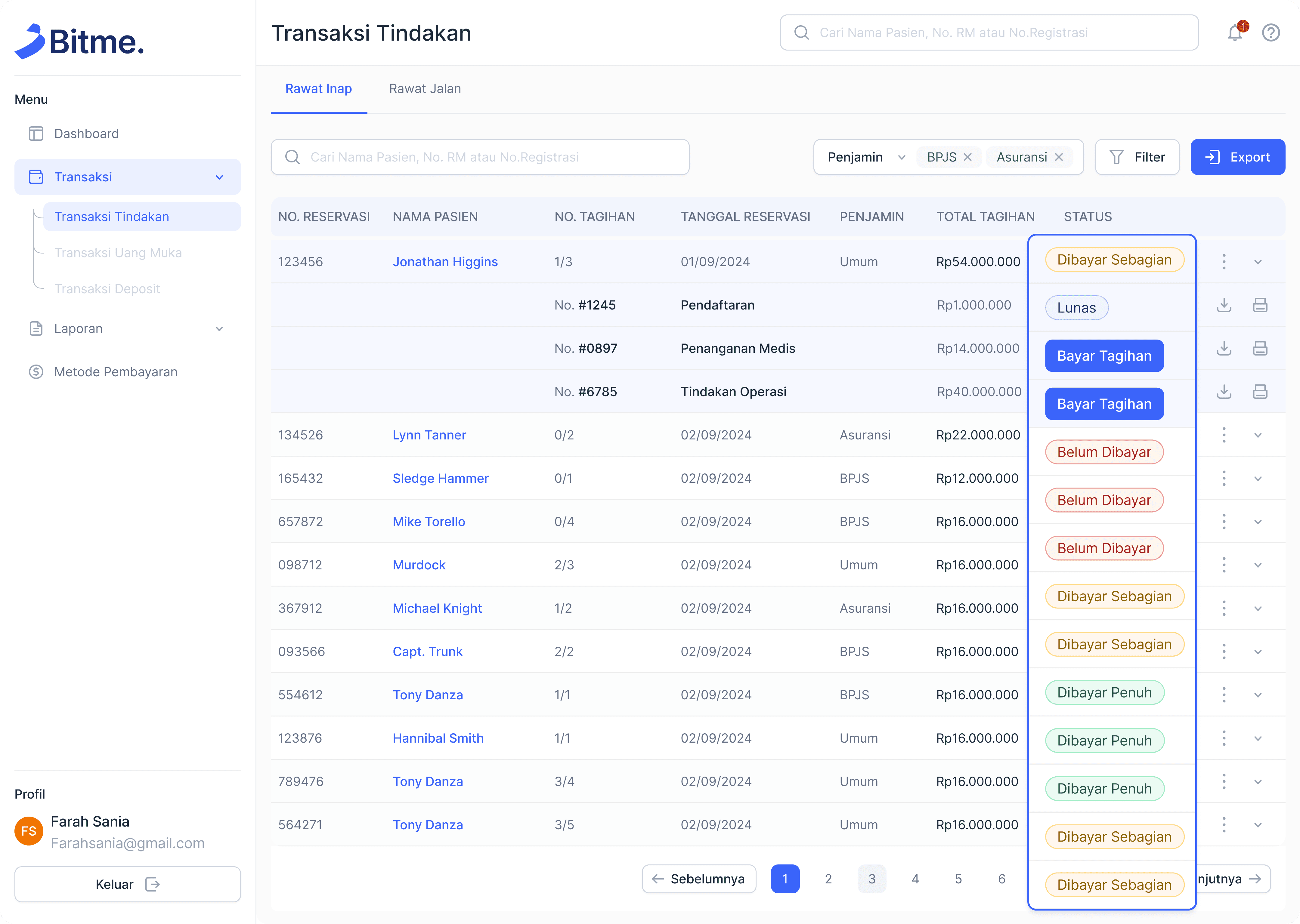
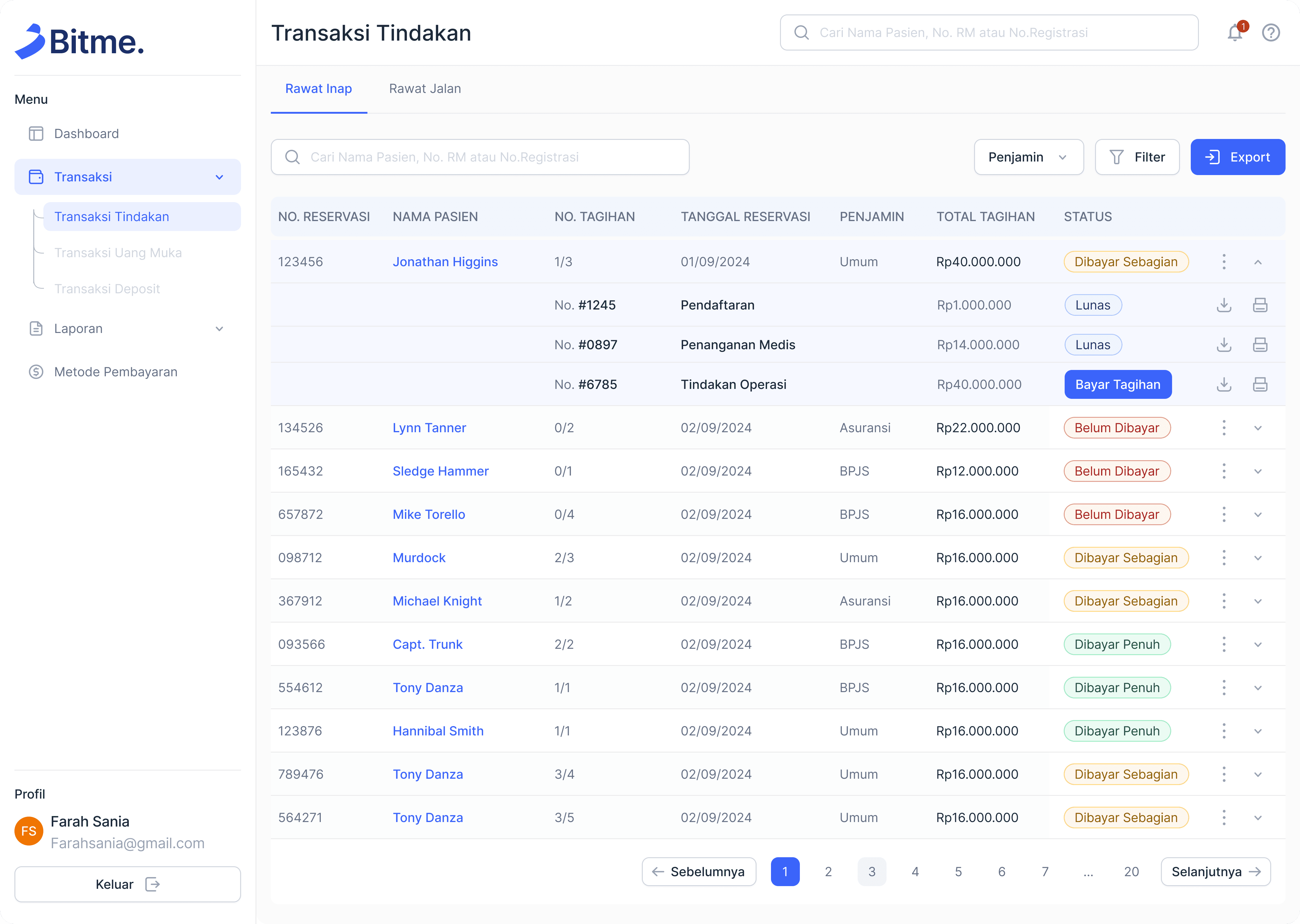
Structured tables that clearly separate reservations and detailed bills.
Color-coded payment status labels to help users quickly identify transaction statuses.
Structured tables that clearly separate reservations and detailed bills.
Color-coded payment status labels to help users quickly identify transaction statuses.
Structured tables that clearly separate reservations and detailed bills.
Color-coded payment status labels to help users quickly identify transaction statuses.
Effective Search and Filtering & Data Export Feature
Effective Search and Filtering & Data Export Feature
Effective Search and Filtering & Data Export Feature
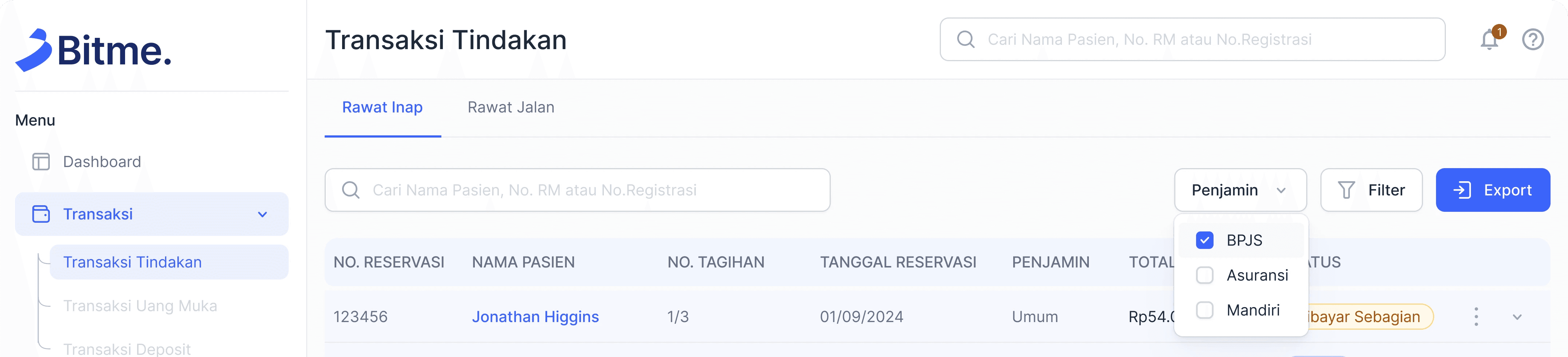
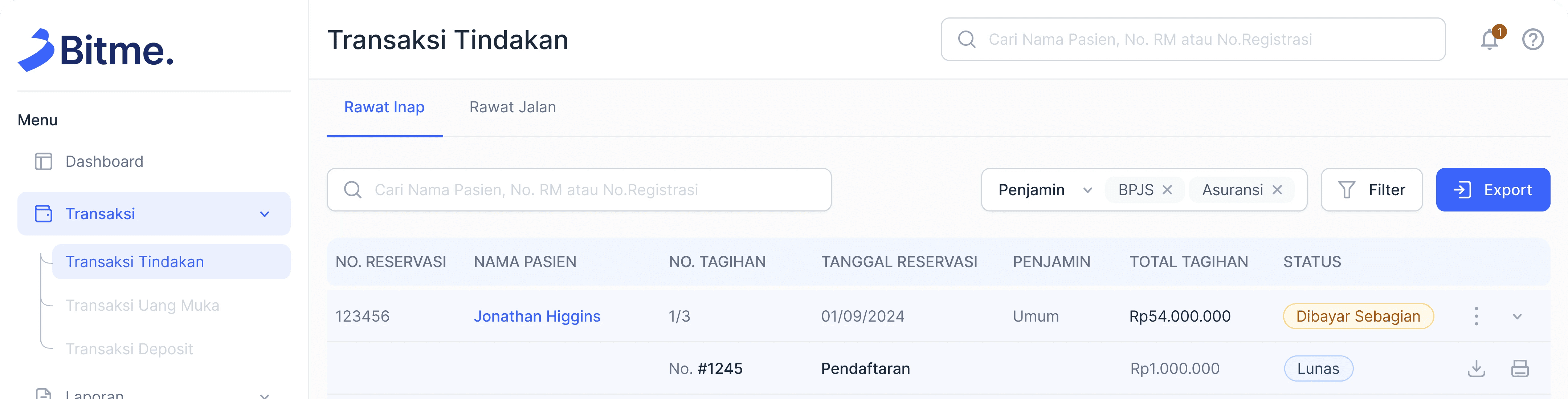
A search bar allowing users to look up patients by name, medical record number, or registration number.
Filtering options based on guarantor and payment status for faster data retrieval.
An export button to facilitate financial reporting and documentation.
A search bar allowing users to look up patients by name, medical record number, or registration number.
Filtering options based on guarantor and payment status for faster data retrieval.
An export button to facilitate financial reporting and documentation.
A search bar allowing users to look up patients by name, medical record number, or registration number.
Filtering options based on guarantor and payment status for faster data retrieval.
An export button to facilitate financial reporting and documentation.
Color-Coded Payment Status Indicators
Color-Coded Payment Status Indicators
Color-Coded Payment Status Indicators
A search bar allowing users to look up patients by name, medical record number, or registration number.
Filtering options based on guarantor and payment status for faster data retrieval.
A search bar allowing users to look up patients by name, medical record number, or registration number.
Filtering options based on guarantor and payment status for faster data retrieval.
A search bar allowing users to look up patients by name, medical record number, or registration number.
Filtering options based on guarantor and payment status for faster data retrieval.
Structured Navigation
Structured Navigation
Structured Navigation
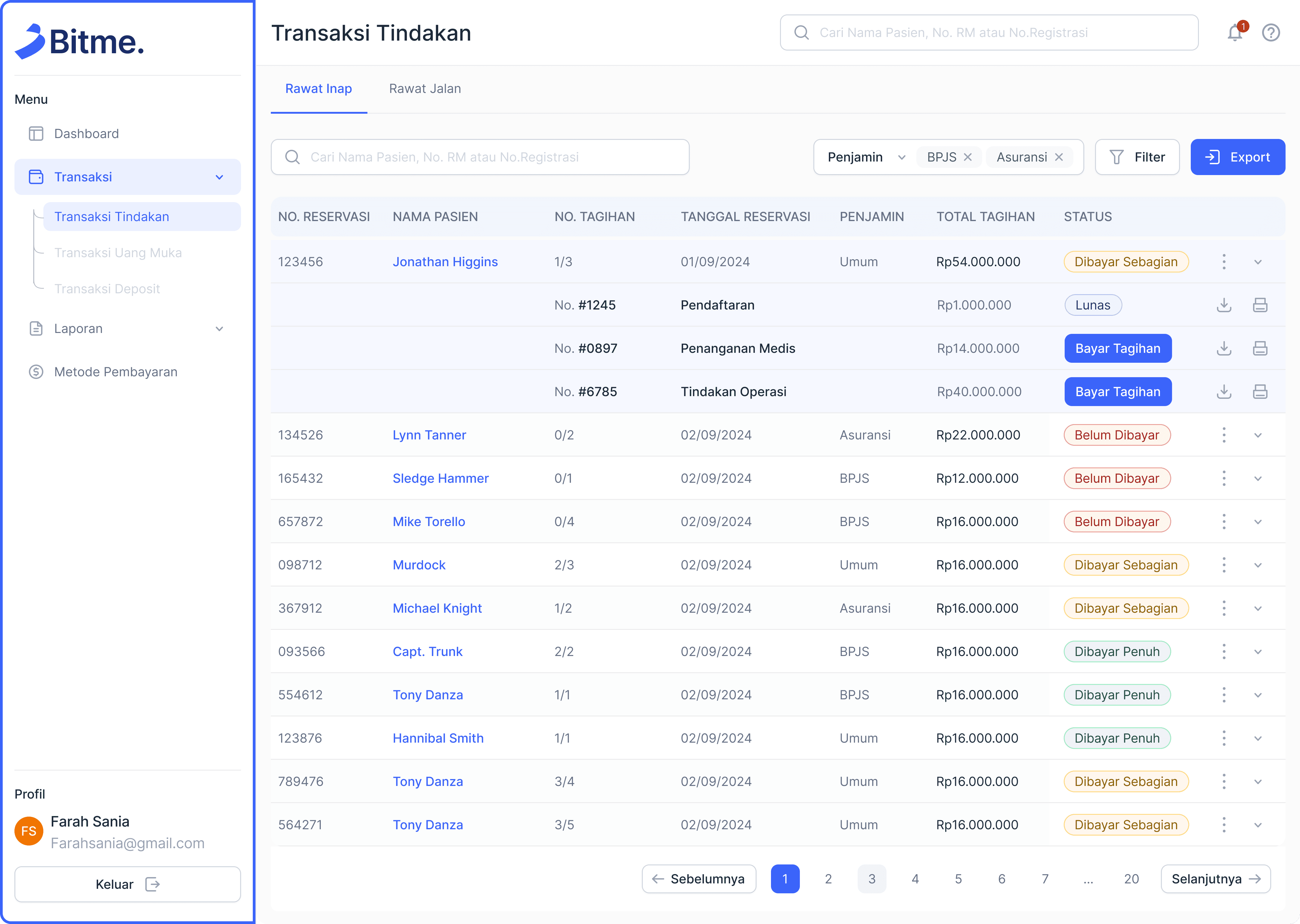
A sidebar for quick access to key features like transactions, reports, and payment methods.
Pagination in tables to manage large datasets efficiently.
A sidebar for quick access to key features like transactions, reports, and payment methods.
Pagination in tables to manage large datasets efficiently.
A sidebar for quick access to key features like transactions, reports, and payment methods.
Pagination in tables to manage large datasets efficiently.
Billing Details & Payment Options Popup:
Billing Details & Payment Options Popup:
Billing Details & Payment Options Popup:
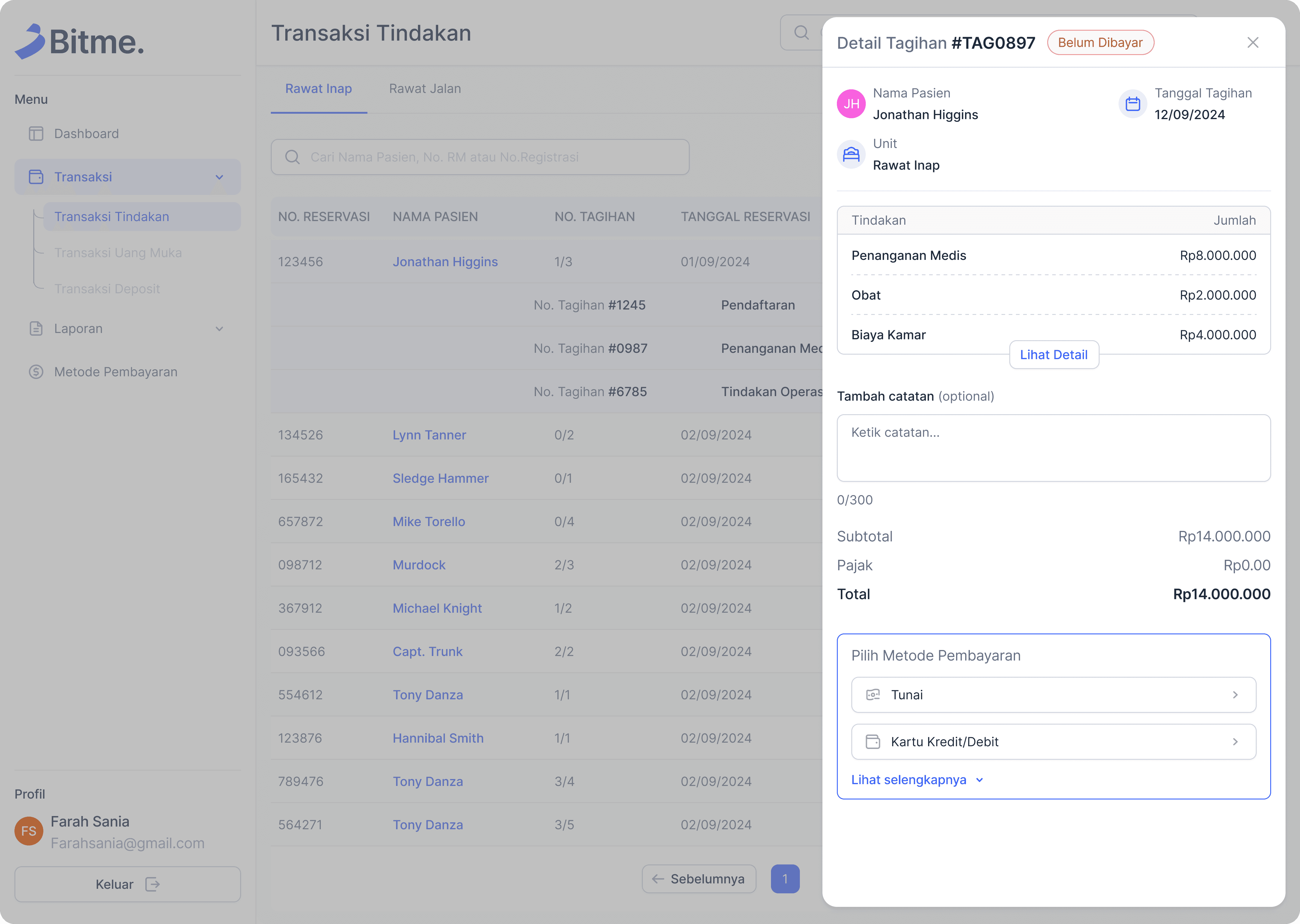
When selecting a transaction, users can view detailed billing information.
The popup includes the patient's name, billing number, inpatient unit, and breakdown of charges.
A notes section allows additional comments, and users can choose from different payment methods such as cash, credit/debit cards, and other payment options.
When selecting a transaction, users can view detailed billing information.
The popup includes the patient's name, billing number, inpatient unit, and breakdown of charges.
A notes section allows additional comments, and users can choose from different payment methods such as cash, credit/debit cards, and other payment options.
When selecting a transaction, users can view detailed billing information.
The popup includes the patient's name, billing number, inpatient unit, and breakdown of charges.
A notes section allows additional comments, and users can choose from different payment methods such as cash, credit/debit cards, and other payment options.
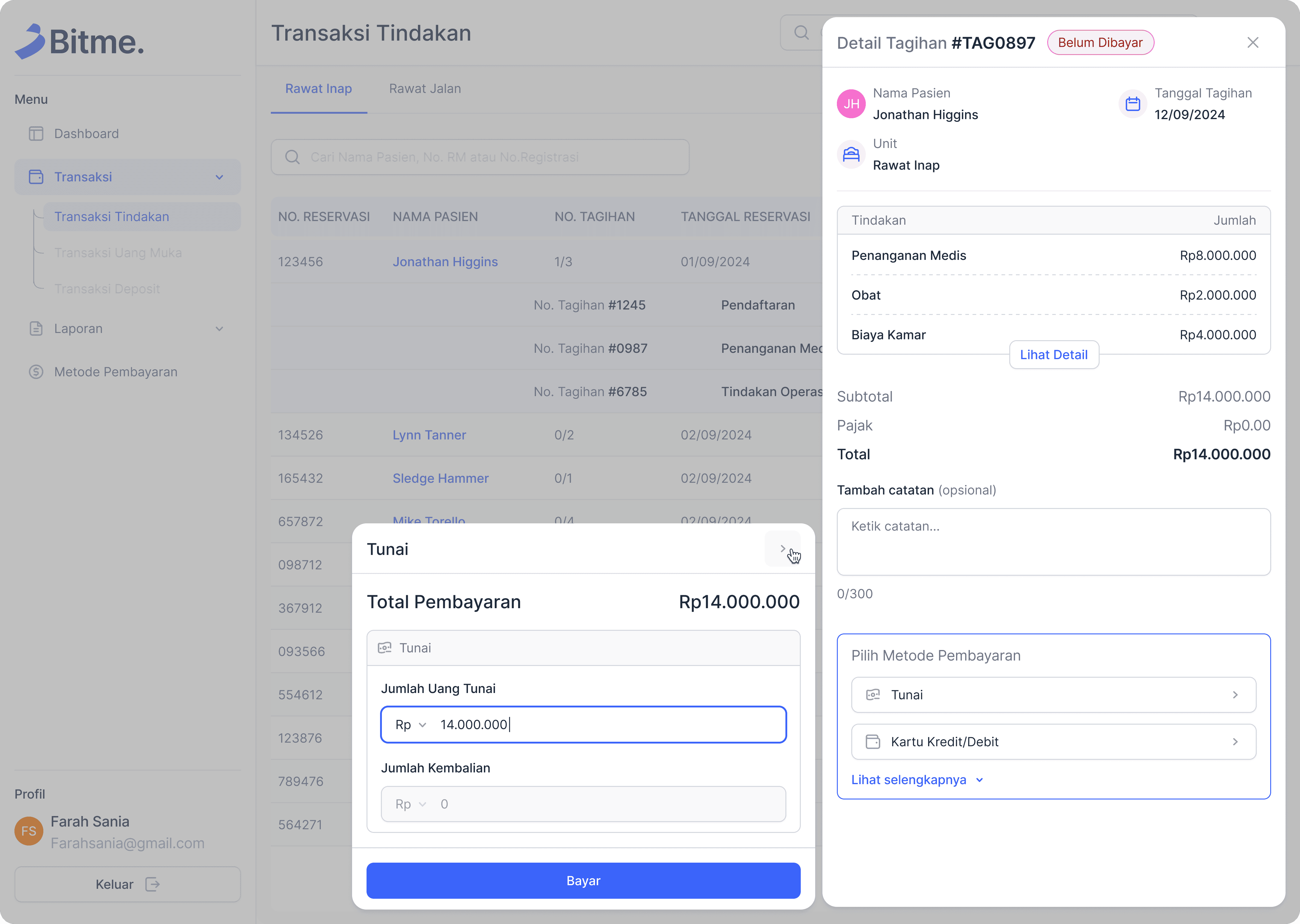
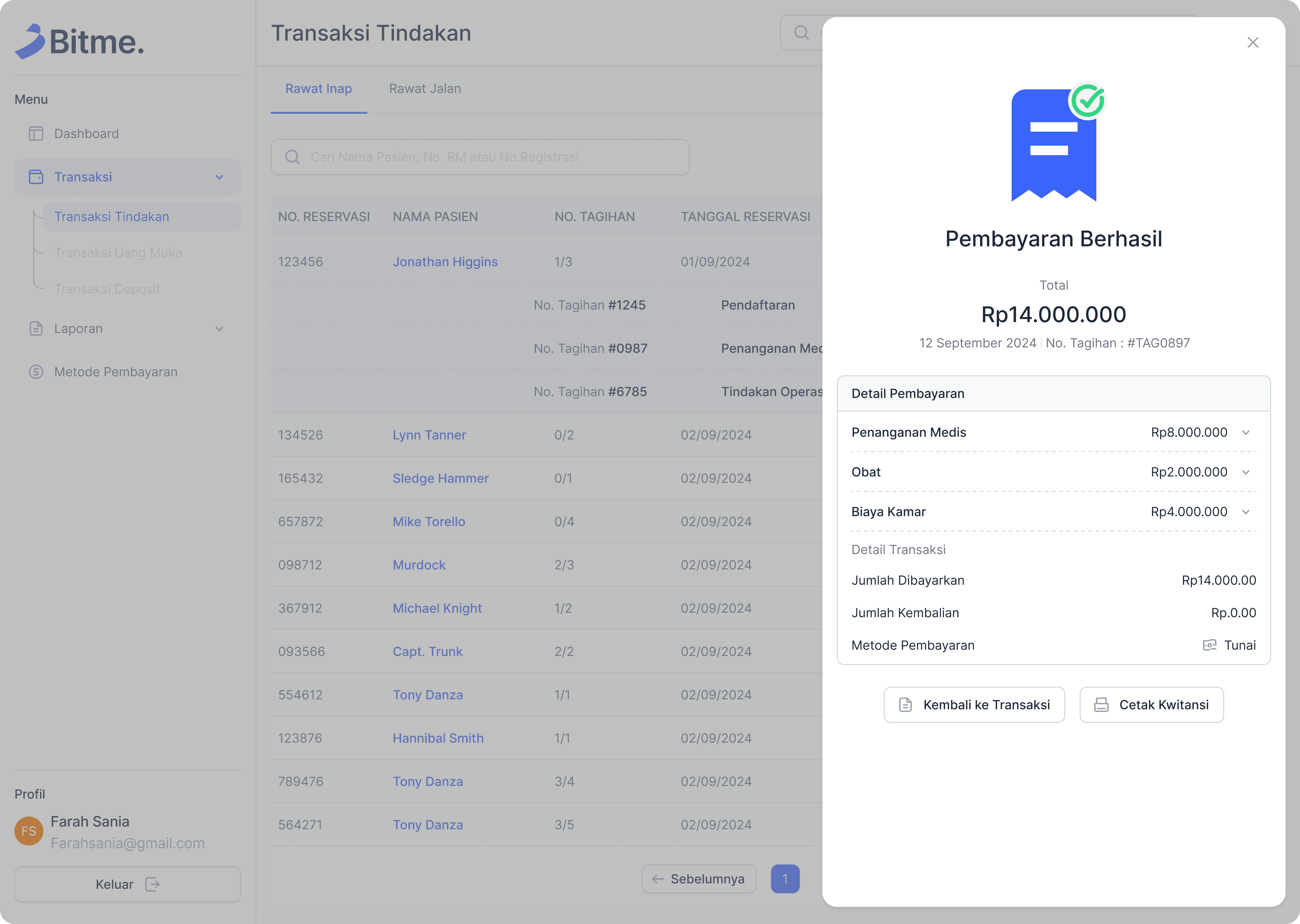
After a successful transaction, the status in the patient list will be automatically updated.
After a successful transaction, the status in the patient list will be automatically updated.
After a successful transaction, the status in the patient list will be automatically updated.
Outcomes
Outcomes
Outcomes
1
30% Reduction in Transaction Processing Time
Before implementation, completing a transaction took an average of 2-3 minutes. After the implementation, transaction completion time was reduced to 1-2 minutes, allowing cashiers to handle more patients efficiently.
1
30% Reduction in Transaction Processing Time
Before implementation, completing a transaction took an average of 2-3 minutes. After the implementation, transaction completion time was reduced to 1-2 minutes, allowing cashiers to handle more patients efficiently.
1
30% Reduction in Transaction Processing Time
Before implementation, completing a transaction took an average of 2-3 minutes. After the implementation, transaction completion time was reduced to 1-2 minutes, allowing cashiers to handle more patients efficiently.
1
30% Reduction in Transaction Processing Time
Before implementation, completing a transaction took an average of 2-3 minutes. After the implementation, transaction completion time was reduced to 1-2 minutes, allowing cashiers to handle more patients efficiently.
1
30% Reduction in Transaction Processing Time
Before implementation, completing a transaction took an average of 2-3 minutes. After the implementation, transaction completion time was reduced to 1-2 minutes, allowing cashiers to handle more patients efficiently.
1
30% Reduction in Transaction Processing Time
Before implementation, completing a transaction took an average of 2-3 minutes. After the implementation, transaction completion time was reduced to 1-2 minutes, allowing cashiers to handle more patients efficiently.
2
User Satisfaction Score Improved by 85%
In user feedback surveys, hospital cashiers rated the new cashier app 4.8/5, compared to the previous system’s 2.6/5. They highlighted ease of use and clarity of financial breakdowns as key improvements.
2
User Satisfaction Score Improved by 85%
In user feedback surveys, hospital cashiers rated the new cashier app 4.8/5, compared to the previous system’s 2.6/5. They highlighted ease of use and clarity of financial breakdowns as key improvements.
2
User Satisfaction Score Improved by 85%
In user feedback surveys, hospital cashiers rated the new cashier app 4.8/5, compared to the previous system’s 2.6/5. They highlighted ease of use and clarity of financial breakdowns as key improvements.
2
User Satisfaction Score Improved by 85%
In user feedback surveys, hospital cashiers rated the new cashier app 4.8/5, compared to the previous system’s 2.6/5. They highlighted ease of use and clarity of financial breakdowns as key improvements.
2
User Satisfaction Score Improved by 85%
In user feedback surveys, hospital cashiers rated the new cashier app 4.8/5, compared to the previous system’s 2.6/5. They highlighted ease of use and clarity of financial breakdowns as key improvements.
2
User Satisfaction Score Improved by 85%
In user feedback surveys, hospital cashiers rated the new cashier app 4.8/5, compared to the previous system’s 2.6/5. They highlighted ease of use and clarity of financial breakdowns as key improvements.
3
Increased Adoption Rate 95%
Within the first 1 months of implementation, 95% of hospital staff had fully transitioned to the new system, indicating successful onboarding and minimal resistance to change.
3
Increased Adoption Rate 95%
Within the first 1 months of implementation, 95% of hospital staff had fully transitioned to the new system, indicating successful onboarding and minimal resistance to change.
3
Increased Adoption Rate 95%
Within the first 1 months of implementation, 95% of hospital staff had fully transitioned to the new system, indicating successful onboarding and minimal resistance to change.
3
Increased Adoption Rate 95%
Within the first 1 months of implementation, 95% of hospital staff had fully transitioned to the new system, indicating successful onboarding and minimal resistance to change.
3
Increased Adoption Rate 95%
Within the first 1 months of implementation, 95% of hospital staff had fully transitioned to the new system, indicating successful onboarding and minimal resistance to change.
3
Increased Adoption Rate 95%
Within the first 1 months of implementation, 95% of hospital staff had fully transitioned to the new system, indicating successful onboarding and minimal resistance to change.
What I Learn
What I Learn
What I Learn
Working as the solo UI/UX designer in this project provided valuable insights into designing for complex financial transactions in a healthcare setting. I gained a deeper understanding of user behavior in medical finance, particularly the challenges faced by hospital cashiers in managing large volumes of transactions efficiently.
One key lesson was the importance of data hierarchy and clarity in UI design. Since financial transactions involve multiple details—such as patient information, bill breakdowns, and payment statuses—it was crucial to design a structured and visually clear interface to prevent errors and confusion.
I also learned how to balance usability and compliance with hospital financial regulations. The system needed to align with standardized payment processes while maintaining an intuitive workflow for staff. Conducting user testing with hospital employees helped refine the design to match real-world needs.
Working as the solo UI/UX designer in this project provided valuable insights into designing for complex financial transactions in a healthcare setting. I gained a deeper understanding of user behavior in medical finance, particularly the challenges faced by hospital cashiers in managing large volumes of transactions efficiently.
One key lesson was the importance of data hierarchy and clarity in UI design. Since financial transactions involve multiple details—such as patient information, bill breakdowns, and payment statuses—it was crucial to design a structured and visually clear interface to prevent errors and confusion.
I also learned how to balance usability and compliance with hospital financial regulations. The system needed to align with standardized payment processes while maintaining an intuitive workflow for staff. Conducting user testing with hospital employees helped refine the design to match real-world needs.
Working as the solo UI/UX designer in this project provided valuable insights into designing for complex financial transactions in a healthcare setting. I gained a deeper understanding of user behavior in medical finance, particularly the challenges faced by hospital cashiers in managing large volumes of transactions efficiently.
One key lesson was the importance of data hierarchy and clarity in UI design. Since financial transactions involve multiple details—such as patient information, bill breakdowns, and payment statuses—it was crucial to design a structured and visually clear interface to prevent errors and confusion.
I also learned how to balance usability and compliance with hospital financial regulations. The system needed to align with standardized payment processes while maintaining an intuitive workflow for staff. Conducting user testing with hospital employees helped refine the design to match real-world needs.
Areas for Improvement
Areas for Improvement
Areas for Improvement
Further optimizing the dashboard layout to reduce cognitive load and improve at-a-glance data comprehension.
Implementing a more dynamic user onboarding experience with interactive tutorials or tooltips for first-time users.
Conducting A/B testing on different UI elements to determine the most effective design choices for user engagement and efficiency.
Further optimizing the dashboard layout to reduce cognitive load and improve at-a-glance data comprehension.
Implementing a more dynamic user onboarding experience with interactive tutorials or tooltips for first-time users.
Conducting A/B testing on different UI elements to determine the most effective design choices for user engagement and efficiency.
Further optimizing the dashboard layout to reduce cognitive load and improve at-a-glance data comprehension.
Implementing a more dynamic user onboarding experience with interactive tutorials or tooltips for first-time users.
Conducting A/B testing on different UI elements to determine the most effective design choices for user engagement and efficiency.
More projects
More projects
More projects
What I Learn
Working as the soloo UI/UX designer in this project provided valuable insights into designing for complex financial transactions in a healthcare setting. I gained a deeper understanding of user behavior in medical finance, particularly the challenges faced by hospital cashiers in managing large volumes of transactions efficiently.
One key lesson was the importance of data hierarchy and clarity in UI design. Since financial transactions involve multiple details—such as patient information, bill breakdowns, and payment statuses—it was crucial to design a structured and visually clear interface to prevent errors and confusion.
I also learned how to balance usability and compliance with hospital financial regulations. The system needed to align with standardized payment processes while maintaining an intuitive workflow for staff. Conducting user testing with hospital employees helped refine the design to match real-world needs.
Areas for Improvement
Further optimizing the dashboard layout to reduce cognitive load and improve at-a-glance data comprehension.
Implementing a more dynamic user onboarding experience with interactive tutorials or tooltips for first-time users.
Conducting A/B testing on different UI elements to determine the most effective design choices for user engagement and efficiency.